Since October 7 my Mac has been running a small product studio with nobody at the desk. Every hour, macOS checks whether there is room for more work. If there is, it starts a headless coding agent with one instruction: invoke the lab-build skill and follow it to the end.
That agent scouts ideas, picks one, writes a brief, builds the product, tests it in three browser engines, and has it reviewed by a model from another company. Then it deploys it, renders a launch video, and leaves an X post waiting for me in Typefully. When it exits, the next run starts from zero.
I call it the Lab. This post explains how it works, piece by piece: the operating system tools, the agents, the skills, the scripts, and the rules. The experiment closes on October 18, and a later post in this series covers the results.
As of October 13:
- 32 runs and 146 hours of unattended agent time. The median run took 2.7 hours.
- 9 products shipped, 6 abandoned at a quality gate, 1 in progress.
- 176 rows in the decision log.
- 0 posts published by an agent. They all wait for me.
A few of the shipped products: antipoda-fm tunes into a live radio station on the exact other side of the Earth. yesca lets you strike a match anywhere and watch a GPU wildfire spread over real terrain with tonight’s wind. maqueta runs every real train in Finland, late, on a miniature wooden layout. mellizo finds your photo’s twin among 22,099 open museum artworks, with CLIP running in your browser. Each one has a public repo, a live URL, a README, and a launch video.
Who built what
I designed this together with an agent. I described what I wanted in a Devin Desktop chat that I’ll call the coordinator. The coordinator wrote most of the scripts in this post, ran their tests, and kept the documentation. My part was the brief, the taste, the permissions, and the feedback when something came out wrong. Most of the rules below exist because one piece of that feedback had to stop being a one-off.
The brief, in my words from the first day: “una serie de mini proyectos variados que queden bien pulidos y con aspecto de terminado e2e”. A set of varied small projects, polished and finished end to end, that I could show as things I built. All open source, all deployed, and all built during the last week and a half of my Devin Max subscription.
The constraints
Four constraints decided most of the design.
- One machine. An M4 MacBook with 16 GB of RAM. No server, no CI runner, no cloud scheduler.
- Nobody watching. Runs happen at 3 a.m. An agent that stops to ask a question wastes the night.
- A fixed budget. The Devin Max quota until it resets, two ChatGPT Plus accounts for Codex, $50 of OpenAI credit, and free tiers for everything else.
- Each product starts from zero. I didn’t want one giant session that slowly forgets what it was doing. Every product gets a fresh agent.
The shape
launchd, every hour
  -> lab-run.sh: is a lane free, and is there work?
       -> supervisor, detached, one per lane
            -> devin -p "Invoke the lab-build skill..."
                 <-> _lab/ store on disk: claims, shared state, decision log
                 -> GitHub repo and Vercel deploy
                 -> Codex and Cursor reviews
                 -> HyperFrames launch video
                 -> Typefully draft and knowledge base note
            -> macOS notification
Lab Console on localhost:4848 reads the agent's session database live
The sections below follow that diagram from top to bottom.
1. macOS is the scheduler
launchd is the macOS service manager. A LaunchAgent is a small plist in ~/Library/LaunchAgents that tells launchd what to run and when. Three of them run the Lab.
| LaunchAgent | Runs | When |
|---|---|---|
com.miguelgarglez.lab | bin/lab-run.sh | Every 3,600 seconds |
com.miguelgarglez.lab.awake | caffeinate -is | Always, restarted if it exits |
com.miguelgarglez.lab.console | node console/server.mjs | Always, on 127.0.0.1:4848 |
The launcher’s plist is short:
<key>ProgramArguments</key>
<array>
  <string>/bin/bash</string>
  <string>/Users/miguelgarglez/Developer/_lab/bin/lab-run.sh</string>
</array>
<key>StartInterval</key>
<integer>3600</integer>
The keep-awake agent exists because pmset -g showed the Mac sleeping after one minute idle. caffeinate -is prevents idle and system sleep while it runs, and KeepAlive tells launchd to restart it if it ever exits.
Every hour the launcher makes a few decisions and exits:
- If a
STOPfile exists in the store, it does nothing.touch ~/Developer/_lab/STOPis my emergency brake. - After the end date, it unloads its own LaunchAgents with
launchctl bootout. The Mac goes back to normal without me having to remember. - It reads its limits from
lab.conf: a daily cap on new runs, 12 hours per run, a date after which nothing new starts, and a schedule of how many lanes may run at each moment. - It looks for orphaned work, meaning a product in
buildingthat no live run owns. Resuming comes before starting something new, and resumes ignore the daily cap. - It takes a free lane and starts a supervisor.
The detach took the longest to get right. launchd waits for the program it started. If the launcher waited for its run, launchd would not fire again until the run finished, and a second lane could never start. So the launcher starts the supervisor in a new session and exits immediately:
python3 -c 'import os,sys; os.setsid(); os.execvp(sys.argv[1], sys.argv[1:])' \
  /bin/bash "$0" --child "$free_lane" "$run_id" "$note" </dev/null >/dev/null 2>&1 &
macOS doesn’t ship a setsid command, so one line of Python calls the system function instead. The test that settled it: a running supervisor survived a launchctl bootout of the job that started it.
The supervisor owns one run. It writes the prompt, starts the agent, and starts a watchdog that kills the agent after 12 hours. It also runs caffeinate -is -w $$, which keeps the Mac awake exactly as long as the supervisor process lives. When the run ends, the supervisor releases the run’s claims, removes the lane lock, and uses osascript to show a macOS notification, either “antipoda-fm is live: https://…” or “Run 20261009-022147-l2 ended without a launch”.
2. A run is one fresh agent session
The agent is the Devin CLI in headless mode:
devin -p --permission-mode dangerous --respect-workspace-trust false \
  --prompt-file "$LAB_RUN_DIR/prompt.md" --export "$LAB_RUN_DIR/transcript.json"
-p runs one prompt without the interactive interface. --permission-mode dangerous lets the agent use every tool without asking, and section 10 covers what stays forbidden. --export writes the full transcript when the session ends.
The prompt is a few lines:
Invoke the lab-build skill and follow it to the end. This is an unattended run.
Run directory: /Users/miguelgarglez/Developer/_lab/runs/20261013-184547-l1. Store: /Users/miguelgarglez/Developer/_lab. Today: 2026-10-13.
Lane 1 of 2. Other lanes may be running at the same time: claim work with lab-claim
and write shared files only through lab-state, as the skill's "Parallel lanes" section says.
Everything else lives in the skill and the store. A crash loses at most one run, because the next run reads the store and continues. The cost is that the skill has to be complete, because nobody can answer its questions.
An early surprise decided the architecture. Inside Devin Desktop’s agent shell, the CLI reported “Not logged in”, and I almost designed everything around running inside the desktop app. Then the coordinator submitted a test job through launchd, and from there the same binary reported “Logged in (via Devin)”. Test in the context the code will actually run in, not the one that is convenient to test in.
Another surprise came on the second night. A service blip killed two runs with “Connection error … retryable: true”, one of them halfway through a review. Now, when the agent exits with an error, the supervisor checks the end of stderr for that retryable flag. If it finds it, it looks up the session id in Devin’s local SQLite database (~/.local/share/devin/cli/sessions.db) and resumes the same session with devin -p -r <id>. It tries up to three times, waiting longer each time. A dropped connection now costs minutes instead of a run.
3. The playbook is a skill
A skill is a Markdown file with front matter that the agent loads when a task matches it. lab-build lives at ~/.config/devin/skills/lab-build/SKILL.md and is the manual for a run. It opens like this:
Nobody is watching. Never ask a question. Decide, log the decision, keep going.
It has thirteen steps. At the start of each one, the run writes a phase id to runs/<id>/phase, so the console can show where every run is.
| Step | Phase | Work |
|---|---|---|
| 0 | orient | Read the store, resume orphaned work, or claim a redo |
| 1 | scout | Three parallel scouts, each with a different lens |
| 2 | pick | Score the pitches, apply the ambition gate, claim one |
| 3 | brief | Identity, signature moment, delight list, architecture, milestones |
| 4 | explore | Hunt for components, sketch 2 or 3 hero directions, look gate |
| 5, 6 | build | Build, then polish and delight |
| 7 | verify | Production build, Playwright in three engines, layout and pin checks |
| 8 | review | Cross-model engineering and design reviews, design gate |
| 9 | deploy | Vercel, live checks, GitHub metadata |
| 10 | video | HyperFrames launch video from real footage |
| 11, 12 | announce | README, X post, Typefully draft, notice, knowledge base note |
Scouting uses subagents. Each run starts three read-only scouts in the background. One always looks at ambitious systems: multiplayer, live data pipelines, on-device machine learning, simulations. The other two get a lens from a list: trending open source, viral launches, open data, new web platform features, everyday pain, culture this week, and small native apps. A run skips the lenses the previous run used, so the ideas don’t drift toward the same place. Each scout returns four pitches in a fixed shape with self-scores, and the run picks across them and the backlog.
The skill points to other skills and reference files at the step where each one matters:
references/taste.mdis the design bar. It comes from people whose work I like: Benji Taylor’s essay “Family Values”, Lochie Axon’s librariestorphandweb-haptics, Emil Kowalski, and Josh Puckett. The coordinator condensed them into seven rules, such as “nothing teleports” and “spend delight on the curve”.references/infra.mdlists the infrastructure that exists, how to use it, and how much each product may spend.emil-design-engandinterface-craftcover motion, storyboarded animations, and a structured design critique.hyperframesand its sub-skills cover the launch video.unslop,humanizer, andtechnical-writingapply to READMEs, interface copy, and posts.show-me-your-workwrites the decision log.
The bigger products span several runs. When a run can’t finish the next milestone in the hours it has left, it commits a tree that builds and appends a Handoff section to the product’s brief. The Handoff lists what is done with evidence, what comes next, and the exact commands to resume. Then the run exits. The launcher finds a building product with no owner and resumes it in the next free lane.
4. Memory is a folder
The store at ~/Developer/_lab/ is the only memory. There is no database and no vector store.
_lab/
  preferences.md     standing orders, with my rulings quoted verbatim
  lab.conf           caps, dates, lanes, Codex accounts
  units.tsv          one row per product and its state
  backlog.md         scored pitches that were not built yet
  redo.md            changes I asked for on shipped products
  pinned.md          ideas I queued myself
  decisions.tsv      append-only decision trail
  briefs/<slug>.md   each product's brief and its handoffs
  scouting/          raw scout reports
  announcements.md   launch notices, newest first
  posts/<slug>.md    X post text
  kb/                knowledge base notes
  retro/             moments collected for these posts
  runs/<run-id>/     prompt, output, stderr, transcript, phase, reviews
  claims/            live claims, one directory each
With plain files, the coordinator chat, every short-lived run, and I all see the same state. I can open any of them in an editor. TSV was a fallback, not a plan. I meant to use an orchestration CLI from a skill pack I use, its dependencies were broken on the first day, and tab-separated files turned out to be enough. The coordinator logged that as the second row of the decision log.
preferences.md keeps my rulings in Spanish, exactly as I wrote them, with the date. The agent’s interpretations sit next to them, labelled as interpretations. When a run wonders whether it may deploy without asking, it finds “Sí, despliega todo” with a date, not a paraphrase.
The decision log has one row per fork, phase end, pivot, or spend:
ts                    phase    decision                                       why
2026-10-07T20:32:31Z  runtime  used plain TSV files instead of the orch CLI   orch.ts fails: Cannot find package commander ...
A product moves through building, verifying, shipping, and shipped, or ends as abandoned. Two states came later: parked, for a product that nearly passed and needs my call, and paused, which the coordinator sets.
5. Two lanes without collisions
On the second morning, three runs had taken the quota from 95% to 82%. At that rate, one lane would leave most of the week unused. So the Lab got a second lane, and with it two agents writing to the same store at the same time. Two scripts keep them from colliding.
lab-claim makes claims with mkdir, because creating a directory is atomic: when two processes race, exactly one succeeds. The directory stores the run id and the PID of its supervisor. Simplified:
take() {
  if mkdir "$dir" 2>/dev/null; then
    printf '%s\n%s\n' "$RUN_ID" "$RUN_PID" > "$dir/owner"; return 0
  fi
  kill -0 "$owner_pid" 2>/dev/null && return 1   # the owner is alive
  rm -rf "$dir" && mkdir "$dir" && record_owner  # the owner died, take over
}
A run claims unit:<slug>, redo:<title>, or pitch:<name> before it touches anything. A claim stays valid while its supervisor process is alive, which kill -0 <pid> checks without sending a real signal. If a lane crashes, the next run takes over its claim and resumes the work.
lab-state is the only program that writes the shared files. Each write takes a global mutex, which is also a mkdir lock, writes to a temporary file, and renames it into place. A rename on the same filesystem is atomic, so a reader never sees half a file. Runs never edit units.tsv directly.
The coordinator tested both before switching the second lane on. Twenty processes racing for one claim produced exactly one winner, and forty concurrent writes lost nothing. The first minute of real parallel work tested it again. Both lanes went for the same redo, and lane 1 won it. Lane 2 had grabbed the product claim in the same shell line before it noticed that it had lost the redo, released the product a minute later on its own, and went scouting. The skill now chains the two claims with &&.
Lanes also keep to their own space: their own product folder, their own Vercel project, their own run directory, and a free port instead of a hard-coded one.
6. Agents check each other
Devin builds. Other agents review and help, and the reviewer always comes from a different model family than the builder.
Codex, OpenAI’s coding agent CLI, has three jobs:
- Engineering review: bugs, rough UX, accessibility, key handling, and README accuracy, ranked by severity.
- Design review: a separate pass that scores ten axes, described in the next section.
- Computer use for GUI work such as Xcode and simulators, and image generation for icons, textures, and OG images. The run looks at every generated asset before using it.
ChatGPT Plus accounts hit a usage limit every few hours, so the Lab never calls Codex directly. It goes through a wrapper called lab-codex. The wrapper has a list of Codex home directories (CODEX_HOME), one per account. It runs codex exec on the first account that isn’t resting and watches stderr for “usage limit”. When it sees it, it marks that account as resting for five hours and tries the next one. If every account is resting, it exits with code 75, and the skill knows that means “use the fallback”.
Cursor CLI (cursor-agent -p) is the fallback reviewer. It also takes isolated subtasks that can run in parallel with the main agent, such as a data-prep script, a test suite, or a self-contained component. Only one agent writes to a directory at a time.
One fallback is banned. On the second day, with Codex at its limit, a run reached for OpenCode with Gemini as the reviewer and spent $2.30 of a budget I had reserved as the last resort. The skill now forbids it in every case, and the second Codex account removes the reason to try.
7. Quality gates are scripts
If I keep one idea from this setup, it is this section.
The early runs showed a pattern. A rule written in the skill holds until it gets inconvenient, and then the agent finds a reason around it. One redo shipped with five design scores of 7 because “every finding was fixed anyway”. Another dismissed an originality score of 6. A third pinned a package version that had been published that same morning, while the skill asked for seven days. Each time, the fix was a script that fails, not a firmer sentence.
design-gate.py. The design reviewer writes a JSON file with the commit it reviewed and ten scores: first impression, signature moment, feel of direct manipulation, spectacle, motion quality, micro-interactions, first-run guidance, typography and layout, originality, and mobile. The gate passes only when all ten are 8 or higher and the reviewed commit is the current HEAD:
head = git("rev-parse", "HEAD")
if not head.startswith(data["reviewed_head"][:7]):
    fail(f"scores are for {reviewed}, but HEAD is {head[:12]}. Re-run the design review on HEAD.")
low = {axis: score for axis, score in scores.items() if score < 8}
if low:
    fail("below 8: " + ", ".join(f"{axis}={score}" for axis, score in low.items()))
The commit check matters more than it looks. Fixing the findings without a new review doesn’t count, because the only scores that count come from a review of the code that ships.
viewport-check.mjs opens the page in Playwright at desktop sizes from 1024x600 to 1920x1080. It fails on page scroll, horizontal scroll, or core controls cut off. It exists because one product needed scrolling at every desktop size, and nobody noticed until a script measured it.
pin-age-check.py fails if any exact dependency pin, or any npx pkg@version in a script, is younger than seven days. Supply-chain attacks tend to show up in fresh releases, and the agent kept reaching for the newest one.
Repro scripts reproduce specific bugs in Chromium, WebKit, and Firefox. The first one came from antipoda-fm’s frozen audio waveform. Two runs blamed CORS. Measuring showed that 33 of the 40 radio streams near the antipode sent CORS headers. The real cause only happened in WebKit, Safari’s engine. The audio played while the analyser returned zeros, and the app read the flat line as a working meter. Installing Playwright’s WebKit and Firefox builds turned “works on my machine” into three checks.
lab-preship runs all of these against a Vercel preview. Products are built on a lab/wip branch. Vercel deploys main to production, and main only moves, by fast-forward, after preship prints PASS.
The last gate moved earlier in the process. Four of the bigger products in a row spent 10 to 24 hours each and then failed the final design review on originality. So a “look gate” now runs in step 4, before any product code exists. Codex reviews the chosen hero direction next to the hero screenshots of every shipped Lab product, and it needs 8 or more on first impression, signature moment, and originality. Failing there costs an hour instead of a day.
The gates are strict on purpose. Six products were abandoned, and their repos stay public with the engine work kept on lab/wip. Strict gates don’t produce taste, though. Laureate passed with a mean of 8.62 after ten review rounds, and I still found it cheap-looking. The score measured execution against a rubric. It couldn’t tell that the idea was a template wrapped around a sentence. Step 2 now has an “ambition gate” that runs before anything gets built: a real system underneath, output that changes on every visit, and a technical centerpiece worth explaining.
8. From repo to launch
Every shipped product uses the same set of platforms.
- GitHub. The run creates the repo early with
gh repo create miguelgarglez/<slug> --public --license mit, pushes small commits as it goes, and sets the topics and homepage at the end. - Vercel hosts every frontend at
<slug>.vercel.app. Vercel’s AI Gateway is the first choice for any model call, with a budget per project. - Supabase handles data, realtime, and vectors. All products share one free-tier project, each in its own Postgres schema, with row-level security on every table and migrations committed to the repo. A free project pauses after a week without traffic, so every product that uses it ships a scheduled job that makes one cheap read every three days.
- Cloudflare Workers and Durable Objects handle realtime rooms and data pipelines. In maqueta, a Durable Object polls Finland’s open train data every 15 seconds and pushes it to every open browser over a WebSocket.
- Models get up to $15 per product, in a fixed order: AI Gateway, then the free Workers AI allowance, then the OpenAI key. The skill prefers work done once at build time over calls on every visit, and work in the visitor’s browser over both. mellizo computes CLIP embeddings in the browser with Transformers.js and searches a pgvector index in Supabase. When a product needs custom vector illustration, a build script asks Quiver for SVGs.
Then the launch material:
- A launch video made with HyperFrames. Each scene is an HTML composition animated with GSAP and rendered to MP4 through headless Chrome and FFmpeg. The footage is the real product, recorded with Playwright’s
recordVideoat twice the device scale. The script reuses the product’s first-run guide, so the video works as a short guided demo. Before keeping a render, the run extracts a still every half second withffmpegand looks at each one. - A README in a fixed order: poster, pitch, live link, what it does, how it works with one interesting technical detail, how to run it locally, and the stack.
- An X post in English, saved through the Typefully MCP server as a draft with the video attached. The skill never sets a publish date, and the agent’s configuration denies deleting drafts.
- A knowledge base note in Spanish. My knowledge base is a private Git repo, which I wrote about in Keeping my context outside the agent. The Lab never touches my working copy, because it often has uncommitted changes.
kb-sync.shkeeps its own sparse clone, writes the note, a generated index, and a changelog row, and pushes. It takes a claim first, so two lanes can’t sync at the same time.
9. Watching it work
The first viewer was lab-watch, a Python script that follows the newest Lab session from Devin’s SQLite database in a terminal. Then I asked for something I could leave open on a second screen.
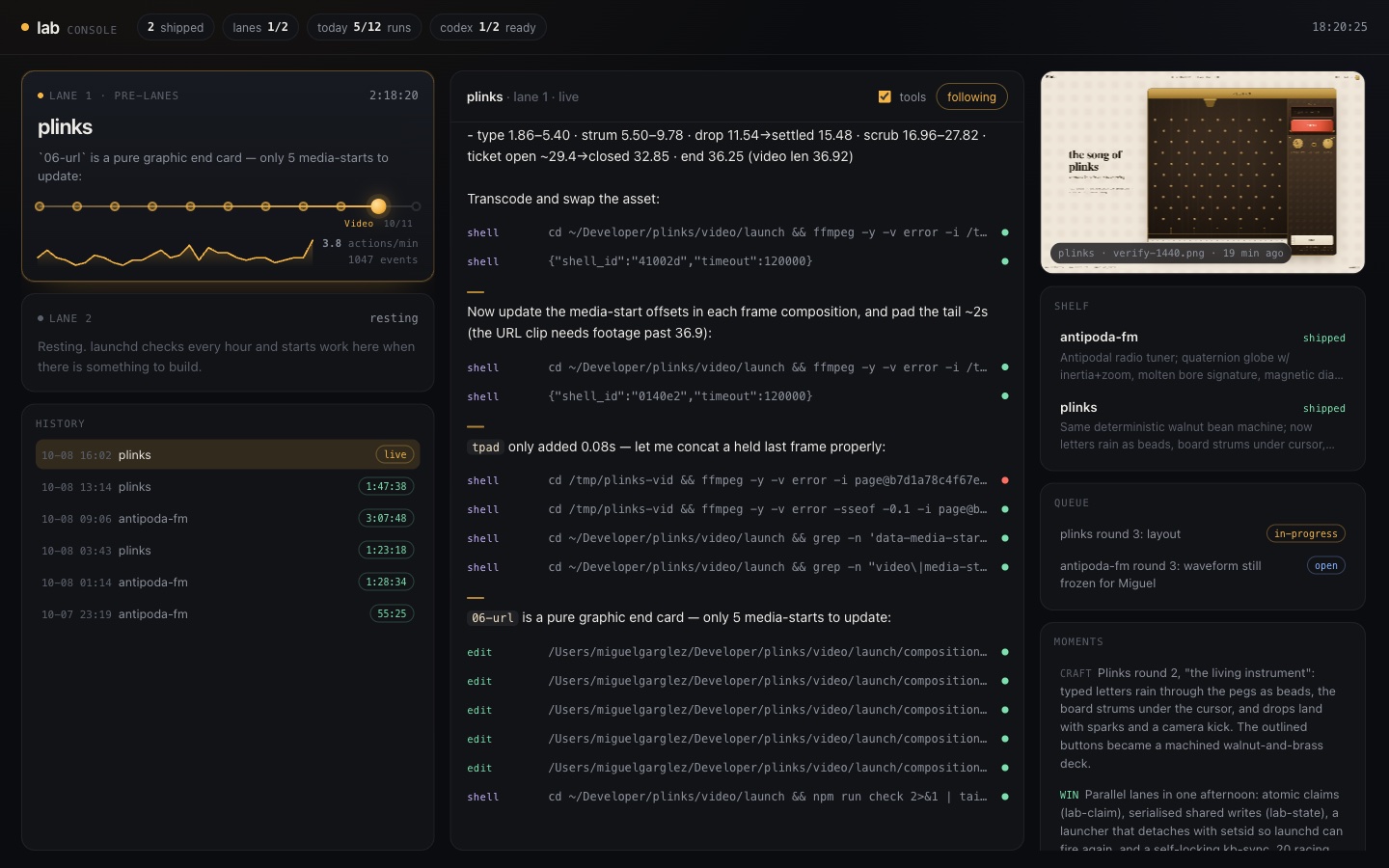
The Lab Console is a Node server with no dependencies. It reads the session database read-only through node:sqlite, plus the store files. It shows each lane’s product, a rail where a bead moves through the thirteen phases, actions per minute, the agent’s narration with expandable tool calls, and the newest screenshot the run saved. The server redacts anything that looks like a key before it reaches the page.
The console paid off on its first afternoon. Watching a run live, the coordinator caught it pinning hyperframes@0.8.141 on the day that version came out, and that is where pin-age-check.py came from. The console also showed that guessing a run’s phase from its tool calls didn’t work, after a scouting run showed up as “Verify”. That is why runs now write their phase to a file.
For complete records there’s lab-sessions-export. Given a project folder, it collects every Devin session that worked there, including subagent branches, every Codex rollout from both accounts, and every Cursor chat. It copies them verbatim, writes a manifest in start order, and scans for anything that looks like a secret. I used it for a hackathon that required the complete AI sessions.
10. Guardrails
Unattended runs use --permission-mode dangerous, so the limits live in the agent’s config.json as deny rules: sudo, every form of force push, gh repo delete, removing Vercel projects, rm -rf on the home or root directory, and deleting Typefully drafts.
Keys live in one file, ~/.config/lab/secrets.env, with mode 600, and only server code reads them. I enter new keys through a hidden macOS dialog, so they never pass through a chat. They reach Vercel through vercel env add, read from that file and never printed.
The guardrail that taught me the most came from a mistake. The first big product needed a database. Devin had a Supabase MCP server installed, signed in to my personal account, and the run used it. It created its table in one of my personal projects and shipped that project’s public key, while the Lab’s own project sat unused. Nothing in the skill told it to do that, but nothing made it impossible either, and the convenient path won. The coordinator cleaned it up within the hour. The lasting fix was structural: deny rules on both Supabase MCP servers, and a rule that any Supabase URL other than the Lab project’s means stop and log.
11. Where I come in
The system can’t judge whether something delights. It can enforce a bar I describe. So my job became describing the bar, one piece of feedback at a time, and making sure each piece became a rule.
The first product took 55 minutes from an empty store to a live URL, a launch video, and a draft post. It was tasteful and static. I said it needed more delight and more craft. That turned into a signature moment in every brief, a delight list of at least eight details, real design references, two or three explored directions, and the scored design review. Later feedback added real 3D and physical feel, first-run guides that teach by doing, videos that work as guided demos, and the rule that the whole experience fits on screen without scrolling.
The channels I use:
- The coordinator chat, where I review products and send feedback. It updates the skill, the store, and the scripts.
redo.md, for changes to a shipped product. Each entry keeps my words verbatim, and the skill limits a redo to what the entry asks. That limit exists because a redo meant to fix the Safari bug fixed it in one commit and then redesigned the whole product over five more. I compared both versions on localhost and kept the old design.lab-pin, to queue an idea I want built. The next free lane builds it instead of scouting.gates.md, where the agent leaves questions for me. Each one has a default it follows if I don’t answer.- The
parkedstate, for products that nearly passed the design gate. They get a preview deployment and wait for my decision. - The notification at the end of every run, and the Typefully drafts, which only I publish.
What I would keep
If I built this again for a different kind of work, I would copy these parts first:
- A scheduler the operating system already has, and a launcher that decides quickly and exits.
- One fresh agent session per unit of work, with all memory in plain files.
- Claims made with
mkdirand owned by a live process. - A reviewer from a different model family than the builder.
- Any rule an agent breaks twice, rewritten as a script that exits non-zero.
- Human decisions recorded in the human’s own words.
The next posts in this series cover the taste side, meaning how design review and delight rules changed the products, with before and after screenshots. After that come what broke and the final numbers once the Lab closes on October 18.